What Does a Dental Insurance Clearinghouse Actually Do?
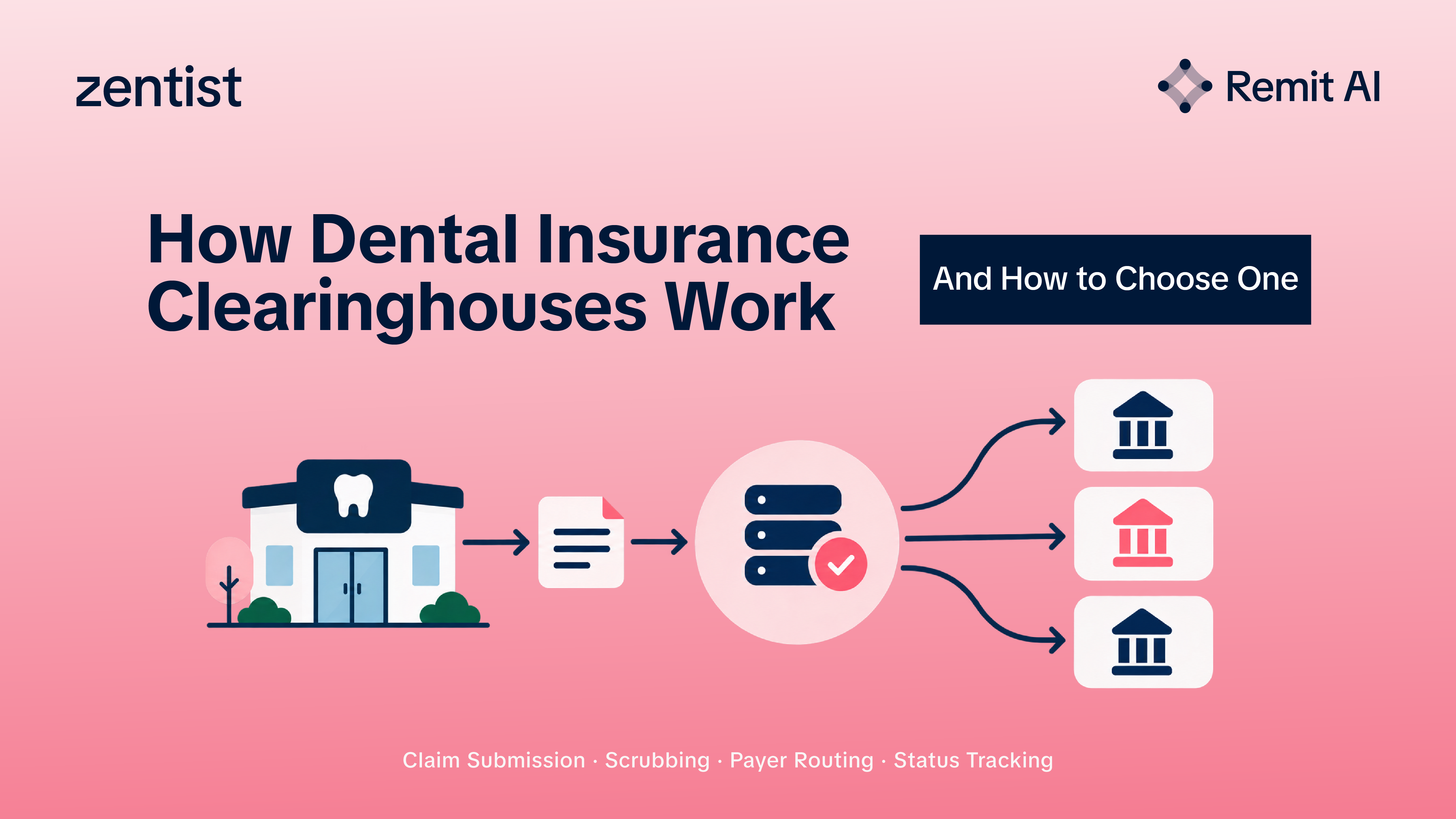
A dental insurance clearinghouse receives claim data from your practice, checks it for formatting or required-field issues, translates it into payer-ready formats, and routes it to the appropriate insurance company. In practical terms, it acts like a quality-control and delivery hub for dental insurance claims, giving your team a more organized way to submit, monitor, correct, and document claim activity.
Instead of logging into multiple payer portals or manually mailing claims, the office uses clearinghouse services to centralize much of the process. A good clearinghouse does not replace billing judgment, clinical documentation, or payer knowledge, but it reduces repetitive administrative work and standardizes insurance claim processing so your team spends less time chasing basic submission problems and more time resolving the exceptions that need attention.
For practices focused on dental practice efficiency, this matters. Every claim rejected for a missing subscriber ID, invalid code format, or payer routing issue creates an extra touch. Those extra touches add up across hygiene, restorative, surgical, orthodontic, and specialty claims.
The Claim Journey From Appointment to Payment

The clearinghouse is only one part of the revenue cycle, but it touches several critical moments, from before the patient sits in the chair through to payment, denial, or appeal.
Insurance information is collected: The front desk gathers patient demographics, subscriber details, group numbers, payer information, and plan details. Accuracy here is critical; even strong claims submission software cannot fully compensate for incorrect intake data.
Eligibility and benefits are checked: Most offices use insurance verification tools to confirm whether a plan appears active and to review basic benefit information. Verification does not guarantee payment, but it helps the team estimate coverage, discuss patient responsibility, and avoid surprises. For practices and DSOs managing this at scale, automated eligibility is a significant time saver exactly the kind of workflow that Remit AI by Zentist is designed to support across multiple locations simultaneously.
Treatment is documented and coded: Clinical notes, procedure codes, tooth numbers, surfaces, narratives, images, and attachments are prepared. The quality of documentation strongly influences how smoothly a claim moves through payer review.
The claim is created and scrubbed: The practice management system or billing platform generates the claim. The clearinghouse checks for missing fields, formatting errors, invalid payer IDs, or other issues before submission.
The claim is routed to the payer: The clearinghouse sends the claim electronically. If a payer has special requirements, the clearinghouse translates or routes the claim according to that payer's accepted format.
Status updates and responses are returned: Rejections, acknowledgments, requests for information, electronic remittance details, and other responses flow back through the system. Strong insurance claim tracking helps the billing team see what needs attention immediately rather than discovering problems days later.
The team follows up: For practices that want to go further, Cavi AR by Zentist now includes an agentic claims review feature that takes clearinghouse efficiency a step beyond what any integration can offer. Most clearinghouses have no API for rejection resolution so Zentist built an AI agent that operates the portal the way a biller does. Twice a day, the agent logs into the clearinghouse on the practice's behalf, sweeps the rejection queue, extracts every rejected claim and its exact error, and surfaces it in Caviar in plain English right on the claim, next to the data that needs fixing. The biller corrects the field in one screen and clicks resubmit. The agent goes back into the portal, enters the correction, submits, and reports the result back into Caviar. Typical round trip: two to five minutes. The biller never leaves Caviar. Thirteen named error types are resolved entirely in-app from invalid member IDs and subscriber name mismatches to missing tooth numbers and blank fee fields. Seven additional error types are routed with clear instructions and tracked to closure. Nothing is silently dropped.
Why Clearinghouse Services Matter for Dental Practice Efficiency
A clearinghouse improves efficiency by reducing friction at high-volume points in the billing process. Claims are repetitive, detail-heavy, and payer-specific. When a practice relies too heavily on manual tracking, small errors are easy to miss, and aging claims quietly pile up.
Clearinghouse services support efficiency through centralized claim submission; teams send many claims through one workflow instead of jumping between payer portals. Pre-submission claim scrubbing flags missing or inconsistent data before the payer rejects the claim. Information moves from the practice system through the clearinghouse to the payer with less manual rekeying. Dashboards and reports make it easier to see which claims were accepted, rejected, pending, or paid. And rejections can be identified and worked sooner when they appear in a consistent, organized queue.
The biggest benefit is not automation for its own sake; it is reducing preventable administrative drag. When the billing team has clear queues, consistent alerts, and reliable payer responses, they can focus on exceptions, documentation, and the payer follow-up that actually requires human judgment.
For DSOs managing dental claims across multiple locations, the clearinghouse layer becomes even more important. Without it, each location may be navigating a different set of payer portals, submission standards, and response formats, creating inconsistency that compounds across the organization. The Zentist guide to dental RCM for DSOs covers how clearinghouse integration fits into the broader infrastructure of a scalable revenue cycle.
What Features Should You Look for When Choosing One?

Choose a clearinghouse by how well it supports your actual billing workflow, payer mix, software environment, and follow-up process. The right option makes dental claims management easier for your team, not simply offers a long feature list that no one has time to use.
Start with integration. The clearinghouse should connect smoothly with your practice management system or billing platform. If your team has to export, upload, download, and re-enter information throughout the day, the tool may create as much work as it removes. Ask specifically how claims, attachments, eligibility checks, rejections, remittances, and status updates move between systems and whether it writes payment information back to the patient ledger automatically or still requires manual posting.
Then evaluate the quality of claim checks. Basic formatting edits are useful, but more meaningful support includes payer-specific rules, missing attachment prompts, invalid provider information warnings, and clear rejection explanations. Your team should be able to understand what went wrong and how to fix it without decoding vague error codes.
Key features to evaluate:
- Dental-specific payer connections for the insurers your practice bills most often
- Claims submission software integration with your existing PMS
- Eligibility and benefits access through built-in or connected insurance verification tools
- Attachment support for radiographs, perio charts, narratives, and photos
- Insurance claim tracking that clearly shows status, payer responses, and next actions
- Reporting tools for rejections, aging, payer issues, and team workload
- Support availability when your billing team needs help troubleshooting
A clearinghouse should also be understandable. If your team cannot quickly identify what needs attention today, the system is not doing enough to support operational clarity.
Common Mistakes Practices Make During Selection
Choosing based only on price is the most common error. Cost matters, but a low-cost tool that causes extra clicks, unclear rejections, or poor payer connectivity becomes expensive in staff time very quickly. The better question is whether the clearinghouse helps your team submit cleaner claims and follow up faster.
Assuming every clearinghouse works equally well for every dental office is another frequent mistake. A general medical billing tool may not fit the attachment-heavy, procedure-specific nature of dentistry. Dental insurance claims rely on tooth-level details, narratives, images, coordination of benefits, and plan limitations that need to be handled cleanly not approximated.
Practices also commonly overlook support and training. Even intuitive systems require setup, payer enrollment, workflow decisions, and staff adoption. If training is thin or support is slow, teams revert to old habits, which limits the value of the technology from day one.
Before deciding, confirm your top payers are supported, verify how attachments are submitted and tracked, confirm that follow-up workflows are covered (not just submission), and involve the people who actually work claims every day your billing coordinator, insurance specialist, or office manager. They know where delays happen.
How to Compare Clearinghouses Without Getting Overwhelmed
Build a short checklist around your practice's real workflow rather than feature lists. Instead of asking "Which platform has the most features?" ask "Which platform removes the most friction from the way we actually bill and collect?"
During demos and sales conversations, ask these specific questions:
- Can it submit to the payers that represent most of our claim volume?
- Does it integrate with our current practice management or billing software?
- How are rejected claims displayed, and are the reasons easy to understand?
- Can our team attach documentation without leaving the workflow?
- How does the system handle secondary claims and coordination of benefits?
- What reports help us monitor insurance claim processing performance?
- Can we track claims by status, payer, provider, location, or aging category?
- What fees apply for claims, eligibility checks, attachments, or additional users?
During a demo, ask the vendor to walk through a real-life scenario: a crown claim with an attachment, a rejected claim that needs correction, a secondary claim, and a claim with no payer response after 30 days. Watching those workflows tells you more than any feature overview.
Implementation Is Where the Value Becomes Real

Even the best clearinghouse needs a thoughtful rollout. Map your current claim process from patient intake through payment posting before switching anything. Identify where claims get delayed, which errors happen most often, and which payer issues consume the most billing team time.
Then set clear workflow rules for who verifies insurance, who reviews claims before submission, who works rejections, who monitors aging, and how often unresolved claims are reviewed. Technology works best when responsibilities are clearly defined before the system goes live.
A practical implementation sequence: clean up payer and provider data before launch, confirm enrollment requirements for electronic submission and remittance, train the billing team on claim creation, edits, attachments, and status queues, run a small batch first to confirm routing, review rejections daily for the first few weeks to catch setup issues quickly, and track trends monthly so the practice can improve intake, coding, documentation, and follow-up over time.
Implementation is not a one-time software switch. It is a workflow improvement project. The practices that get the most from dental billing solutions pair better tools with better habits and measure the results.
Better Claims Management Starts With Visibility
A clearinghouse cannot make every payer pay faster, and it cannot fix incomplete documentation after the fact. But it gives your team a clearer, more reliable way to manage the work between treatment and reimbursement. That visibility is what makes timely follow-up possible and what prevents dental insurance claims from aging unnoticed until the filing window closes.
When evaluating clearinghouses, focus on fit, usability, payer connectivity, claim tracking, and the support your team needs to use the system consistently. The right clearinghouse should help your practice submit cleaner claims, identify problems sooner, and build the operational foundation a strong revenue cycle requires.
For practices and DSOs that want the full remittance layer ERA collection, payment posting, denial management, and AR prioritization built on top of their clearinghouse infrastructure, Remit AI by Zentist handles that complete cycle across 5,000+ practices and 725+ payers.
FAQ
Heading

Answer

