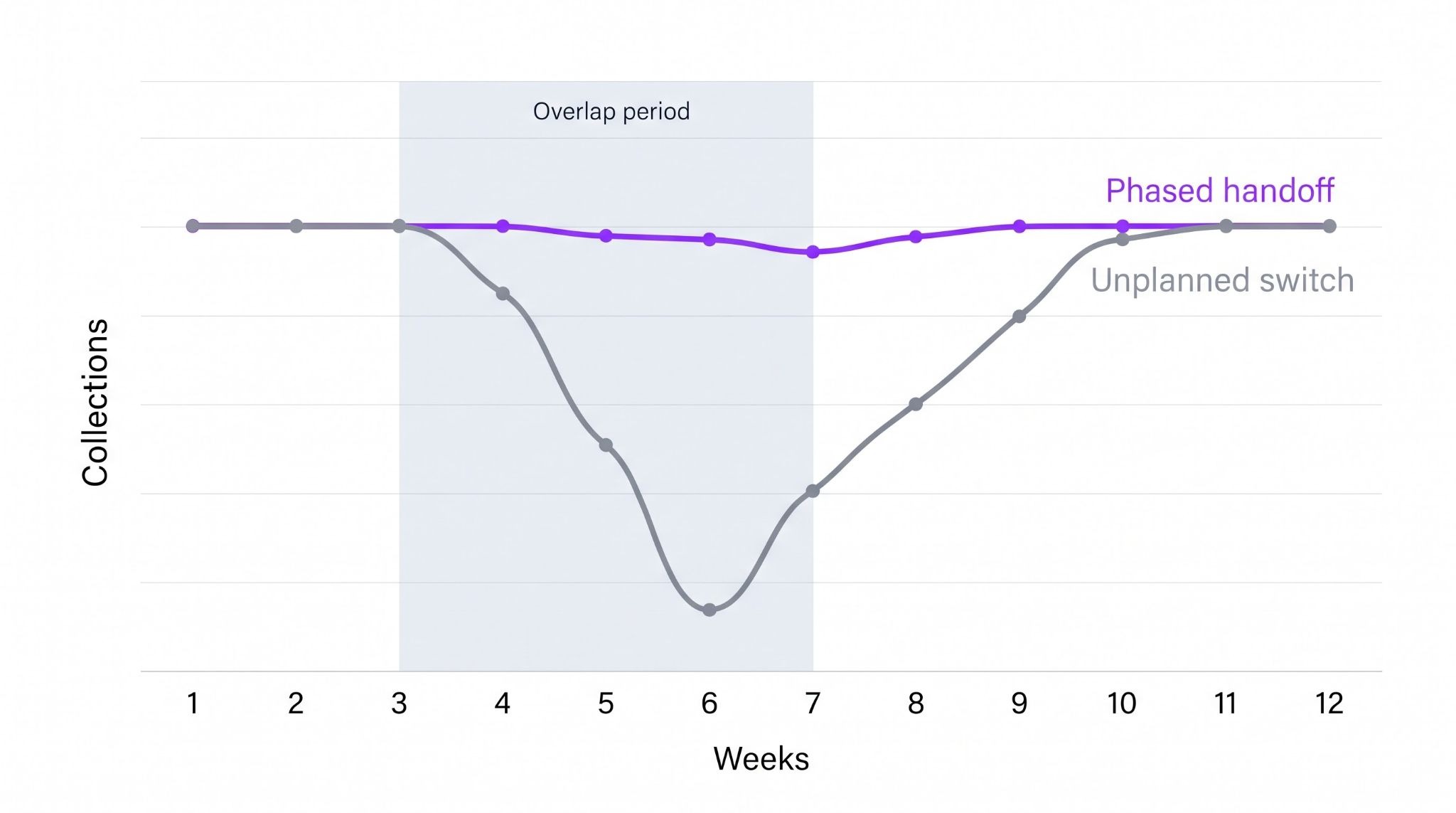
Switching dental RCM vendors is risky for one reason: work falls between the old vendor and the new one. Claims stop getting followed up, payments stop getting posted, and the drop shows up in collections 30 to 60 days later. DSOs that switch safely treat it as a controlled handoff, not a go-live date. They settle who owns old AR, get their data and access out before the contract ends, and move locations in waves.
When is it time to switch dental RCM vendors?
It's time to switch when the same problems keep coming back after you've raised them. One bad month isn't a reason. A pattern is.
Common signs:
- AR keeps aging with no clear next step: Claims sit without an owner, a follow-up date, or a note of what was done.
- Payment posting runs behind: Your team can't connect deposits, remittances, and patient balances without asking the vendor.
- Reports don't reconcile: Location reports and group totals use different definitions, or adjustments appear without explanation.
- Your staff keeps rescuing the vendor: Office managers chase claims or fix errors that are supposed to be in the vendor's scope.
- Every new location needs a workaround: Acquisitions get onboarded each time differently instead of through one repeatable process.
Before you blame the vendor, check your own side. Sometimes the problem isn't the vendor alone. Many billing issues start inside the practice, and they will follow you to the next partner if you don't fix them first .
Look for these internal causes:
- Inconsistent workflows across locations: Each office verifies insurance, collects copays or attaches X-rays its own way, so the vendor gets different inputs from every site.
- Gaps at the front desk: Missing or outdated insurance details, skipped eligibility checks and wrong patient information lead to rejections before a claim is even worked.
- Unclear ownership: Nobody inside the group owns vendor follow-up, so open questions sit unanswered on both sides.
- Limited access: The vendor is missing payer portal logins, PMS permissions or bank reports it needs to finish the work.
What should you ask a new dental RCM vendor before signing?
Ask questions that make each vendor prove how it handles real problems, not just show a dashboard. The best test is your messiest work: the claims and payments that are stuck in your AR today.
Bring three or four de-identified examples from different locations and ask the vendor to walk through each one: .
- A partial payment: The payer paid less than expected. How does the vendor find out why and decide whether to appeal?
- A missing remittance: Money hit the bank, but no EOB or ERA arrived. How does the vendor match the deposit to the right claims?
- A rejected claim: The claim came back for a missing X-ray or narrative. Who fixes it, and how fast is it resubmitted?
- A secondary balance that never closed: The primary paid, but the secondary claim was never filed. How does the vendor catch it?
How a vendor answers these tells you more than any demo. When comparing dental revenue cycle management companies, also ask:
For a broader view of the market, Zentist's guide to the best dental billing companies in 2026 compares the main models.
What happens to old AR when you switch vendors?
Old AR is where most of the money is lost. Decide in writing whether the outgoing vendor finishes its open claims or hands them over, and draw the line using an agreed claim list.
That list should include open claims, rejections, appeals in progress, pending attachments, credit balances, and payments that arrive after the contract ends. For every claim that moves, get its current status, last action, next action, and deadline. Reconcile claim counts and dollar totals before you accept the handoff. A spreadsheet export isn't proof your new team can work those accounts.
Watch timely filing limits closely. A claim that sits untouched during the handoff can age past the payer's deadline and become a write-off.
What do you need from the outgoing vendor before the contract ends?
Get everything you'll need while the outgoing vendor still has a reason to help. Once the contract ends, getting data back is slow.
- Full claim history, notes and attachments by location
- Open AR aging and the agreed handoff list
- Payer portal and clearinghouse logins, moved to named accounts your group controls
- EFT and ERA enrollment details, so remittances route to the right place
- Credit balance and refund logs
- Recent reports, so you have a baseline to compare against
ERA routing gets missed most often. If remittances keep going to the old vendor, your new team gets deposits it can't explain. Zentist's guide to dental payer portals covers the access side.
How DSOs switch dental RCM vendors without disrupting cash flow
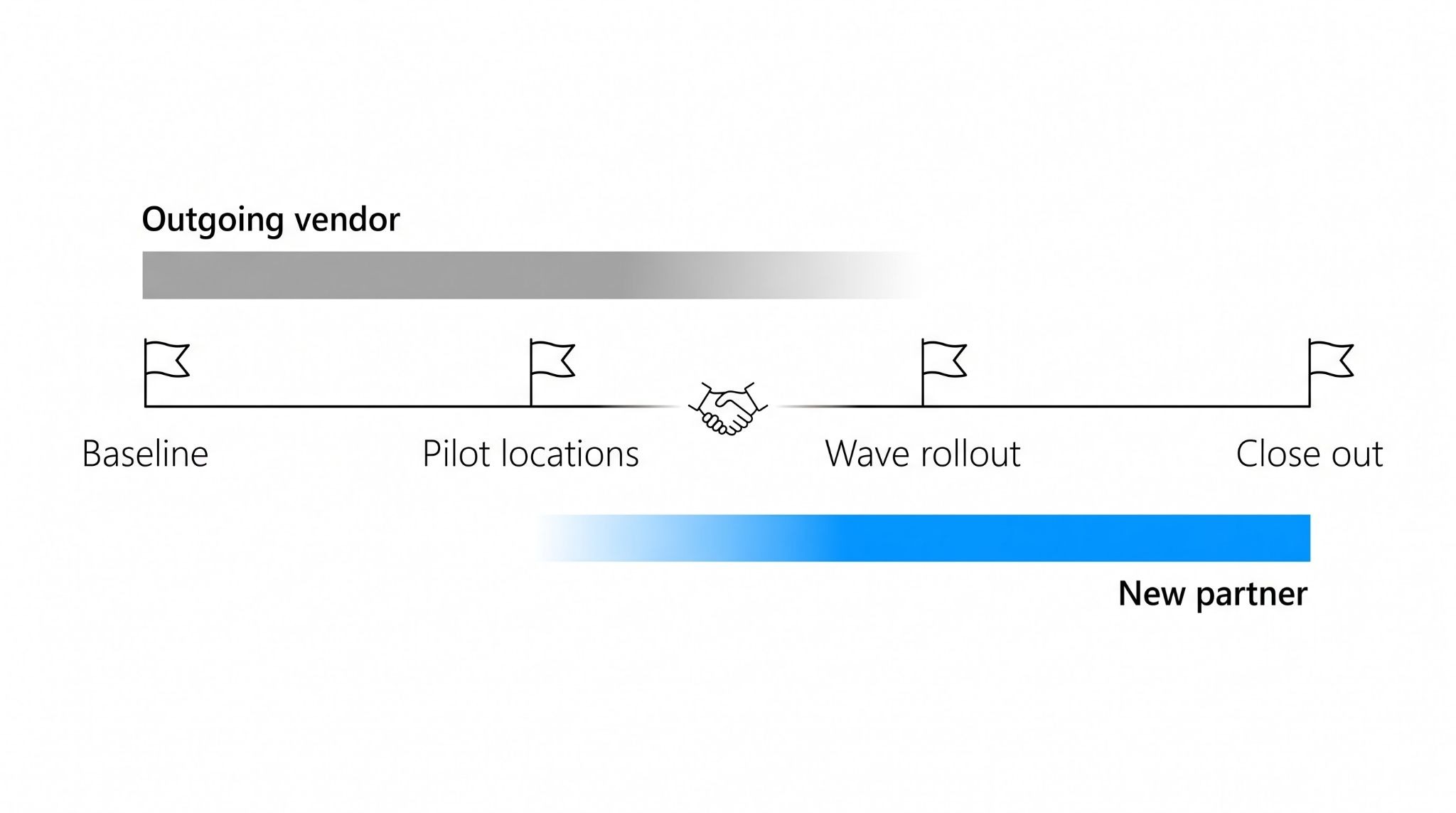
Move in stages, and test the full payment path before adding more locations. Appoint one internal transition lead with authority over finance, operations, IT, practice managers, and both vendors. Then work through this sequence:
- Capture the baseline: Record open claims, AR aging, unposted payments, rejection queues and recent collections for each location.
- Test access and data: Check every login, the clearinghouse connection, payer portals and bank reporting. Spot-check transferred claims against the old system.
- Run a pilot: Pick two or three locations that reflect different PMS setups, specialties and payer mixes, not just the easiest office.
- Follow one claim end to end: Submission, acceptance, remittance, reconciliation, posting and any remaining patient balance.
- Expand in waves: Add locations only after the pilot passes agreed checks, and repeat the checks each time.
During overlap, give every claim and posting queue a single owner. Two teams working the same queue creates duplicate submissions and double-posted payments.

Which numbers should leadership watch during the transition?
Watch money received and work completed separately, by location. A healthy deposit total can hide a posting backlog that becomes a problem next month.
Review these weekly against each location's baseline:
- Days in AR and AR over 90 days
- Unposted payments and unmatched deposits
- Claim rejections and denials
- Claims nearing timely filing limits
- Patient statements on hold
Set an alert threshold for each one and give every alert an owner. Zentist's dental KPI dashboard guide explains how to define these consistently across locations. Finance should also plan for a slower collection month rather than assume an instant improvement.
How does Zentist keep revenue moving during a vendor change?
Zentist runs the routine work, so your team can focus on exceptions while a transition is underway.
Remit AI collects EOBs and ERAs, matches every EFT to its remittance, reconciles each payment and posts it into your PMS through Autoposting.. EFT and ERA enrollment is included for up to 30 payers, which helps with the routing changes a switch requires.
Caviar reviews claims before submission, flags likely rejections and sends fixes to a biller for approval, with a full audit trail. For paper checks, Vault gives each location its own PO box with same-day deposit and matching. Because Zentist works across mixed PMS setups, acquired locations can join the same process. Zentist's guide to dental RCM for DSOs covers how this works at scale.
Switch partners without the queue
Zentist helps 5,000+ dental practices and DSOs keep revenue moving from check-in to cash. Book a demo to plan your transition.
FAQ
Heading

Answer

