.png)
A rejected claim is a claim that never reached the payer. Something small tripped a validation check, like a member ID off by a digit, a missing tooth number, or a blank fee, and the claim stopped at the door. Fixing it has always meant the same routine: log in to a portal, hunt for the claim, decode a cryptic message, retype a field, resubmit, and repeat.
Caviar's Agentic Claims Review takes that routine off your team. An AI agent finds the rejection, explains it in plain English inside Caviar, lines up the fix, and resubmits once your biller approves. Below are the questions we hear most, answered in detail.
What is Agentic Claims Review?
Agentic Claims Review is a capability in Caviar where an AI agent works on your rejected claims alongside your billing team. The agent does the portal work. Your biller makes the decision.
It covers three jobs that used to fall entirely on a person:
- Finding every rejected claim and the exact reason it was rejected.
- Explaining each problem in plain English, on the claim, next to the data it relates to.
- Resubmitting the corrected claim through the portal and reporting the result back in Caviar.
Your biller never has to leave Caviar to get a rejected claim moving again.
Why use an agent instead of an integration?
Because most payer portals and clearinghouses don't offer an integration to build against. There is no API, no clean data pipe. There is a login screen and a set of buttons, the same ones a person uses.
The industry's usual answer has been a scripted bot that clicks through the portal the same way every time. That works until something changes. An agent takes a different approach. It operates the portal the way a person does: it signs in, navigates, reads the validation errors, types into the fields, and clicks the buttons. The difference is that it reads the situation instead of following a fixed script.
That is why this matters beyond claims. Where the industry has no integration to offer, an agent can create one. Claims Review is the first place Zentist customers get to see that in action.
How does it work, step by step?
The loop has four parts, and your biller is in the middle of it.
- The agent finds the problems. On a regular schedule, it signs in to the payer portal or clearinghouse with your practice's own credentials, sweeps the queue of rejected claims, and pulls every claim with the exact rejection message.
- Caviar explains them. Each error is matched to a rule and shown on the claim in plain language: what is wrong, in which section, in which field, and what to do about it. Errors are grouped by section, with live progress as each one is cleared.
- Your biller approves the fix. Only the affected fields are surfaced, so there is no hunting through the whole claim. The biller reviews the fix, saves it, and watches the issue turn green.
- The agent resubmits. When the biller clicks resubmit, the agent goes back into the portal, enters the corrections, submits the claim, and writes the outcome, success or error, back onto the claim in Caviar. A typical round trip takes a few minutes.
Every action the agent takes is recorded in the claim's activity trail, so you can always see what happened and when.
.png)
What can it fix today?
Thirteen rejection types are resolved inside Caviar, with no portal login. They fall into four groups.
Subscriber and eligibility
- Member ID invalid, wrong value or wrong length: correct it in place.
- Subscriber first or last name invalid: correct it against the plan record.
- Subscriber date of birth invalid: correct it in place.
- Invalid subscriber city: correct it and update the portal.
- Subscriber gender missing or mismatched: set the correct value.
Patient information
- "Maximum age exceeded," which is usually a placeholder date of birth: Caviar interprets the error, suggests the real date of birth, and applies it in one click.
- Patient details that don't match the subscriber when the relationship is "Self": Caviar surfaces only the fields that differ, such as name, date of birth or gender, and aligns both sections.
Charge lines
- A required field left blank, such as tooth, surface, area of the oral cavity, fee or procedure code: Caviar points to the exact line and field.
- A field that must be blank: Caviar clears the offending value.
- An invalid tooth value: correct the tooth number in place.
- A missing procedure code: add the charge line and validate it before saving.
Claim information
- Release of information or assignment of benefits flags required: set the required indicators.
- Remarks for unusual services missing: write the narrative directly in Caviar.
Behind these fixes sits a rule catalog, not hard-coded logic. That means coverage can expand to new rejection types without waiting on a software release.
What still needs a person?
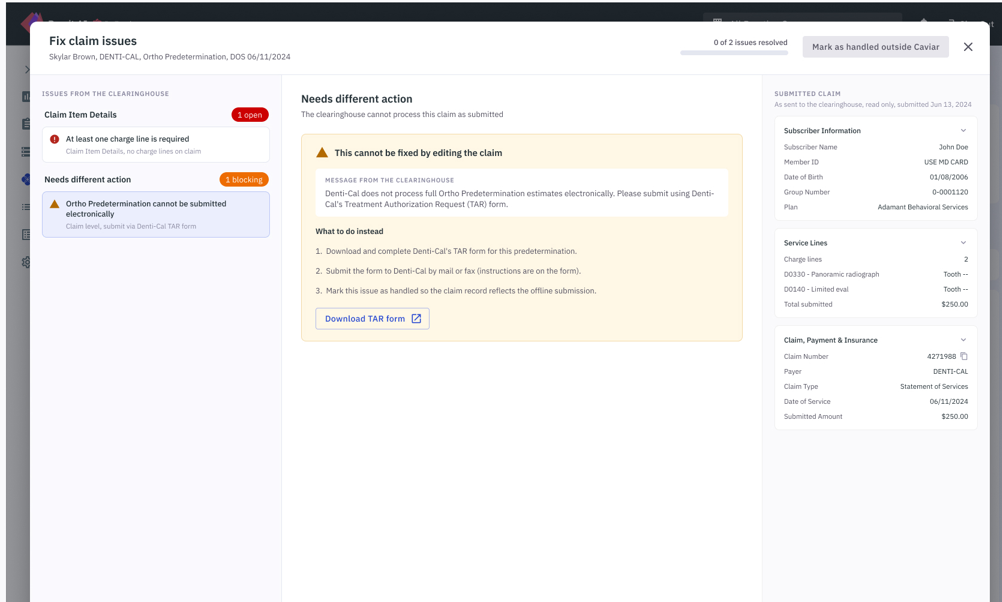
Some rejections can't be resolved from inside Caviar because they need an action in the portal or with the payer. Examples include:
- an attachment such as an X-ray or other supporting document
- provider matching
- claims where payer and patient amounts must balance
- a zip code that must be a valid USPS zip code
Caviar doesn't pretend otherwise. For these cases, it names the problem, tells your biller exactly what to do, and lets them mark the claim as handled outside Caviar. The claim keeps moving instead of sitting in limbo.
We're working to bring more of these cases into the agent's reach over time.
What if the agent sees an error it has never seen before?
It still shows up. Any rejection the agent doesn't recognize appears on the claim with the original message from the payer or clearinghouse, word for word. Nothing is silently dropped. And because the rules behind Claims Review are configuration, new error types can be added to coverage without a release cycle.
Is it safe to give an agent access to our portal?
This is the first question most teams ask, and it deserves a direct answer. Three things keep the agent accountable.
- Your credentials, scoped to your account: The agent signs in with the practice's own credentials, limited to that account.
- A full audit trail: Every action the agent takes is written back to the claim's activity trail in Caviar. The work is auditable, not opaque.
- A person approves the change: The agent resubmits once your team gives the go-ahead. It doesn't quietly rewrite claims on its own.
There is a principle behind this. The more autonomy an agent has, the more visibility and accountability need to grow around it. "The system did it" is never an acceptable answer to a patient asking about their balance. So every Zentist agent is built with traceable actions, rules kept as configuration rather than code, and a clear owner for every decision.
The agent also works from context, not just the latest error. It looks at the claim and its history before it acts, because an agent that ignores what has already been tried is just a faster version of someone starting the claim from scratch.
How is an agent different from the bots we already use?
A script follows instructions. An agent can respond when the task doesn't go exactly as expected.
Scripts are useful for predictable, repeatable work, and they have a place in revenue cycle management. The trouble starts when something shifts: a portal changes its layout, a session expires, a new error code appears, or a claim doesn't fit the expected path. A script fails, and a person has to pick up the pieces.
An agent works the same portal a human would, but it interprets what it sees and decides what to do next, within boundaries you can see. If it can't proceed, it tells you clearly why.
We learned this the hard way with Remit AI. Our automation could find and match roughly 90 to 95 percent of remittances. The remaining 5 to 10 percent held the hard exceptions: expired credentials, changed portals, broken sessions. Once you automate the majority of a workflow, the exception becomes the product. Agents belong at that failure boundary, and that is where Claims Review lives.
Does it replace my biller?
No. The agent takes the investigation and the repetitive portal work off your biller's plate. Your biller stays involved wherever judgment is needed: approving the fix, handling a payer call, attaching a document, or deciding what to do with an unfamiliar situation. The aim is less time spent on clicks and more time spent on decisions.
Who benefits most?
- Billing teams work from one screen instead of two systems. The rejection queue becomes a worklist with a filter, not an archaeology project.
- RCM managers stop rejected claims from aging out of view. Every problem claim is visible, categorized, and actionable in Caviar.
- DSOs and multi-location groups get the same agent sweep in every office, with no per-location process and no per-location training.
- Practices see claims that were stuck before the payer ever saw them reach adjudication sooner. That is real cash flow.
How do I get started?
Agentic Claims Review is live now.
- If you already use Caviar, open a rejected claim, and you'll see the agent's findings on the claim. Talk to your account manager if you'd like a walkthrough for your team.
- If you're new to Caviar, request a demo, and we'll show you the full loop on a real rejected claim.
What's next?
Claims Review closes the loop on claims that were rejected. The next step we're planning is for claims that were accepted: bringing payer statuses back into Caviar, so your team can see what the insurance did with a claim after validation, without leaving Caviar and without waiting for a remittance to find out.
Our view is simple. Rejected claims shouldn't need another tab, another login, or another person to babysit a script. The agent does the portal work. Your team makes the call.
Caviar's Agentic Claims Review is live now. See it in action

